
June 20, 2019
--
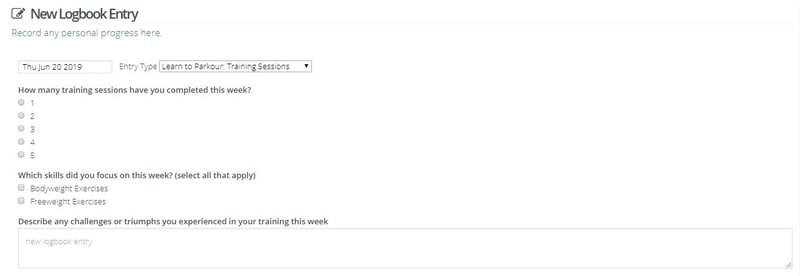
In order to make the Logbook feature more versatile and easy to use, we have updated and improvements.
Log:
You can view Logbook help articles here.
Important note for existing Logbook users:
If you change the prompt type in your current logbook from text fields to one of the new prompt types i.e. radio button or checkboxes, the answers that have been logged by users to date are not lost and will continue to be displayed in the logbook entry fields
IMPROVEMENTS TO THE LOGBOOK FEATURE

Copyright Checklick Inc. All Rights Reserved.
June 20, 2019
--
In order to make the Logbook feature more versatile and easy to use, we have updated and improvements.
Log:
You can view Logbook help articles here.
Important note for existing Logbook users:
If you change the prompt type in your current logbook from text fields to one of the new prompt types i.e. radio button or checkboxes, the answers that have been logged by users to date are not lost and will continue to be displayed in the logbook entry fields
IMPROVEMENTS TO THE LOGBOOK FEATURE
Copyright Checklick Inc. All Rights Reserved.
